Help · Orders & fulfilment
Print on a 58mm or 80mm roll
Tell Pasal which paper your printer takes, and the bill is laid out to fit it.
A thermal printer takes one width of paper and one only. Tell Pasal which one you have and every bill is laid out for it, so nothing wraps in the wrong place and no price slides off the edge.
- Open Shop profile, then Receipts and tax under Selling.
- Set Printed bill width. 80mm is the standard receipt printer and the starting choice. 58mm is the small counter unit and the battery printer a delivery rider carries.
- Save. Every bill printed after that fits the roll.
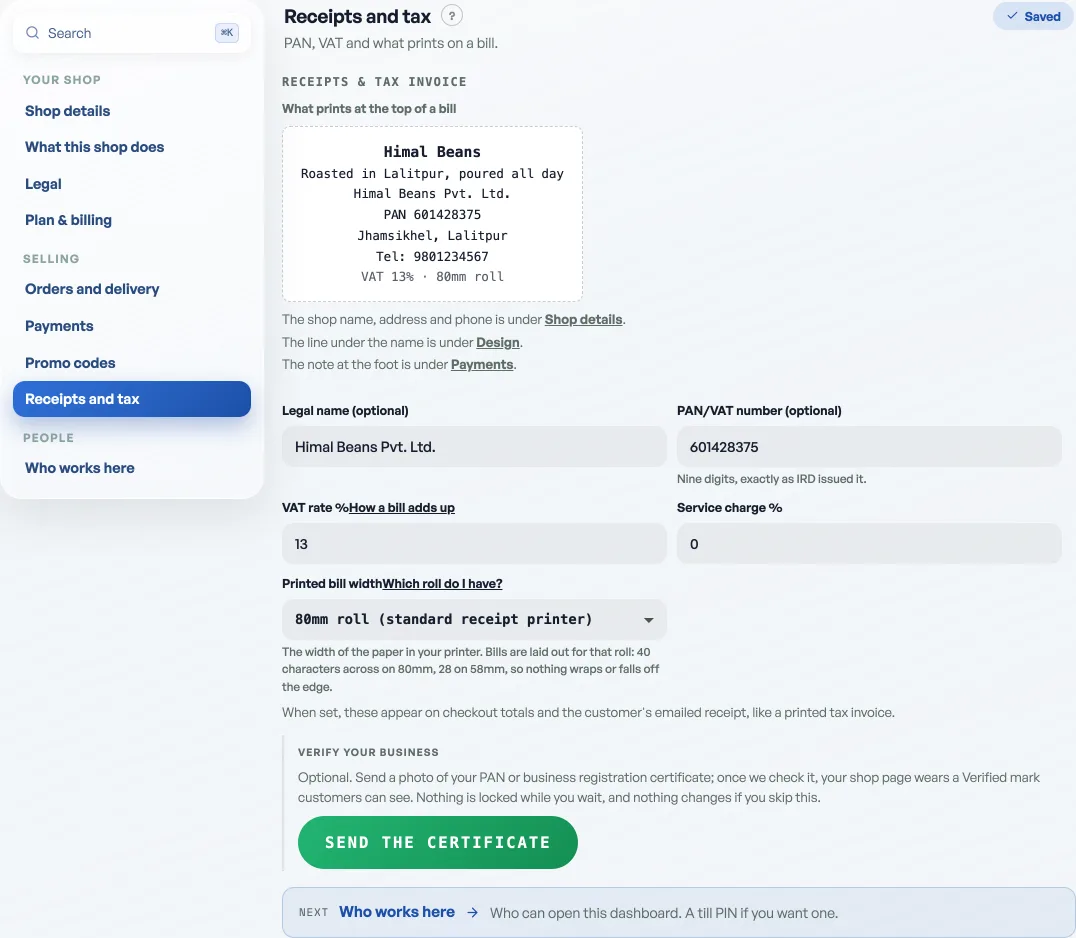
Not sure which you have? Measure the paper. A 58mm roll is a little over two inches across and fits 28 letters on a line; an 80mm roll is about three inches and fits 40. If your printed bills have been wrapping names or cutting prices off, you are on the wrong one.
It belongs to the shop, not the machine
Set it once and it holds everywhere: the phone behind the counter, the laptop in the back, and whoever covers the counter on Saturday all print the same width without being told. That is also why it is on your Shop profile and not in your browser.
Pick the printer, not Save as PDF
When the print box opens, the paper size comes from Destination. Choose your thermal printer there. Leaving it on Save as PDF gives you an A4 sheet with a narrow strip of bill down one side, which is the commonest reason a bill "prints wrong". See Print receipts on a thermal printer.
Printing on an ordinary office printer instead? Do not use this. Send the customer their emailed PDF receipt, which is already made for a sheet of paper.
- Print receipts on a thermal printerConnect a 58mm or 80mm roll printer and print from the counter or any past order.
- The PDF receipt your customer keepsEvery order now emails a proper receipt the customer can print, file, or hand to their accountant.
- Managing orders on your boardMove tickets through fulfilment, collect payment, and keep the board tidy.